 Worksheets
Personal net worth
Your bigger picture, beyond payday.
Bring what you own and what you owe into one view. Keep your values current and understand what the total does - and does not - tell you.
Opens Worksheets Personal. Choose Create account on the next screen.
- Start with your own records
- No live bank connection required
The everyday problem
Income alone does not show your financial position
A good pay month is not the same as a strong overall position. Savings, a vehicle and other assets sit on one side; loans and credit-card balances sit on the other. Looking at one without the other can hide the amount you actually own after debts are accounted for.
A clearer way to manage it
How Worksheets helps
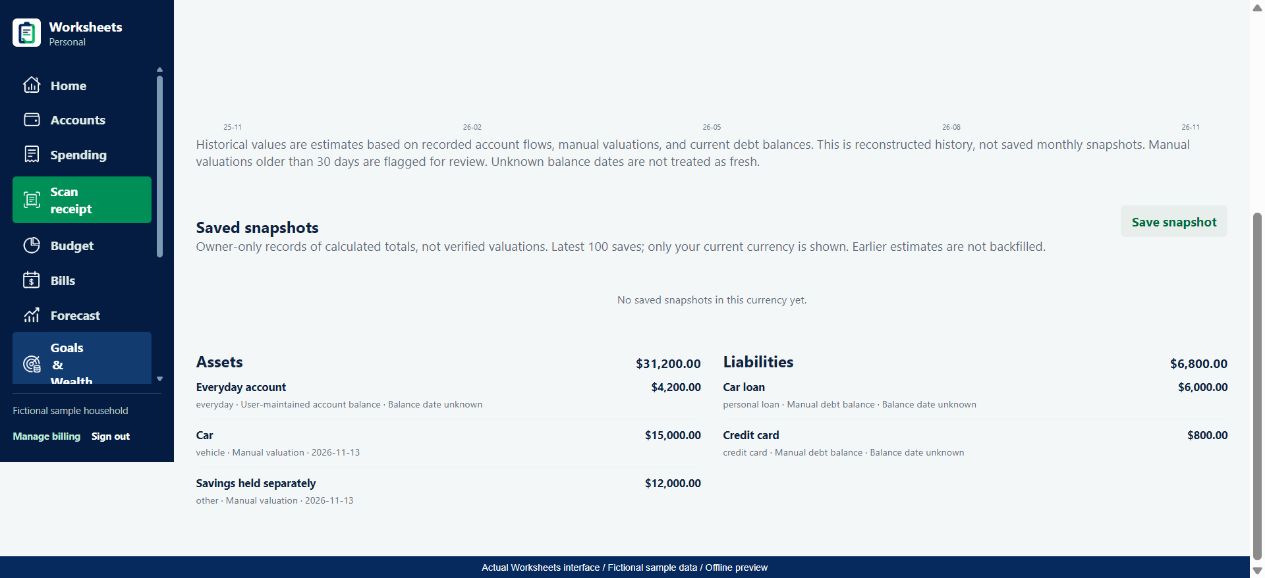
Worksheets Personal brings recorded account assets, manually entered assets and liabilities into Goals & Wealth > Net worth. It shows assets, liabilities and their difference, with a breakdown of the source values. Manual and user-maintained figures are labelled. Owner-only snapshots let you save calculated totals, while the estimated-history chart reconstructs past values from the records available.
- Review assets and liabilities together rather than mistaking total assets for net worth.
- See whether values are manually maintained and need another check.
- Keep a dated snapshot of a calculated position without calling it a professional valuation.
From the app to your everyday routine
Three practical steps
Add what you own and what you owe
Check account balances and add relevant assets and debts in Goals & Wealth. Enter a value and its date. Do not add the same savings balance both as an account and as a separate manual asset.
Review the breakdown
Open Net worth and inspect the assets and liabilities behind the total. A linked item may already represent an account, so check the relationship before adding another copy. Update a debt balance when it changes.
Compare like with like over time
Keep currency and valuation dates consistent. If you are the household owner, use Save snapshot to keep a calculated point-in-time record. Read estimated history as reconstructed information, not a verified performance record.
A worked example
A$31,200 of assets is not A$31,200 of net worth
Fictional Australian-dollar figures - not personal financial advice
A fictional household records A$4,200 in its Everyday account, A$12,000 of savings held separately and a vehicle estimated at A$15,000. The savings are not also included in the Everyday balance. It owes A$6,000 on a car loan and A$800 on a credit card. These simple AUD values produce a net worth of A$24,400.
| Recorded value | Asset | Liability |
|---|---|---|
| Everyday account | A$4,200 | - |
| Separate savings | A$12,000 | - |
| Estimated vehicle value | A$15,000 | - |
| Car loan | - | A$6,000 |
| Credit card | - | A$800 |
A$31,200 assets - A$6,800 liabilities = A$24,400
This is not A$24,400 of available spending cash: A$15,000 is a vehicle estimate. Adding a previously unrecorded asset can change reconstructed history and the estimated monthly change without creating an investment gain. Keep the distinction between a current total, reconstructed history and a saved snapshot.
Use the numbers thoughtfully
What to keep in mind
A useful tool makes its limits clear. Check the underlying records before making a financial decision.
- Manual figures are planning estimates, not professional property, vehicle or investment valuations.
- A net worth figure is not the cash available for a purchase. Assets may not be readily accessible or saleable at the entered value.
- History is reconstructed from recorded flows, valuations and current debt data. It is not a complete historical statement or verified investment return.
Good questions
Net worth FAQs
For independent Australian money guidance, visit MoneySmart: net worth calculator. This is a helpful resource, not an endorsement of Worksheets.
How is net worth calculated?
Assets minus liabilities. Entered values, linked-account relationships, currencies and missing records determine how useful that total is. Review the breakdown rather than relying only on the headline.
Will Worksheets automatically value my home or car?
No automatic professional valuation is promised. You maintain manual asset estimates and valuation dates. The interface flags older manual valuations for review.
Does the history chart show my actual investment returns?
No. It reconstructs estimated history from the available records. New entries, changed valuations and incomplete historical data can affect the chart; it is not a performance statement.
Can net worth be negative?
Yes. If recorded liabilities exceed recorded assets, their difference is negative. Check completeness and values before interpreting the number. It does not by itself determine what you can afford to spend.
One part of your bigger picture
Keep building your money routine
Explore all Worksheets Personal features or compare plans and pricing.
Worksheets Personal
A clearer picture starts with your next step.
Bring your records together and build a money routine that makes sense to you.
Choose Create account after opening the app.