 Worksheets
Personal budgeting
A budget you can actually keep up with.
Give everyday spending a plan. Set category budgets, compare them with your recorded transactions and see what is left before the month gets away from you.
Opens Worksheets Personal. Choose Create account on the next screen.
- Start with your own records
- No live bank connection required
The everyday problem
A bank balance is not a spending plan
You can have money in your account and still be spending faster than you intended. Groceries, transport and meals out arrive at different times, so a single balance rarely tells you which part of your plan needs attention. A useful personal budget connects the amount you planned with the purchases you have actually recorded.
A clearer way to manage it
How Worksheets helps
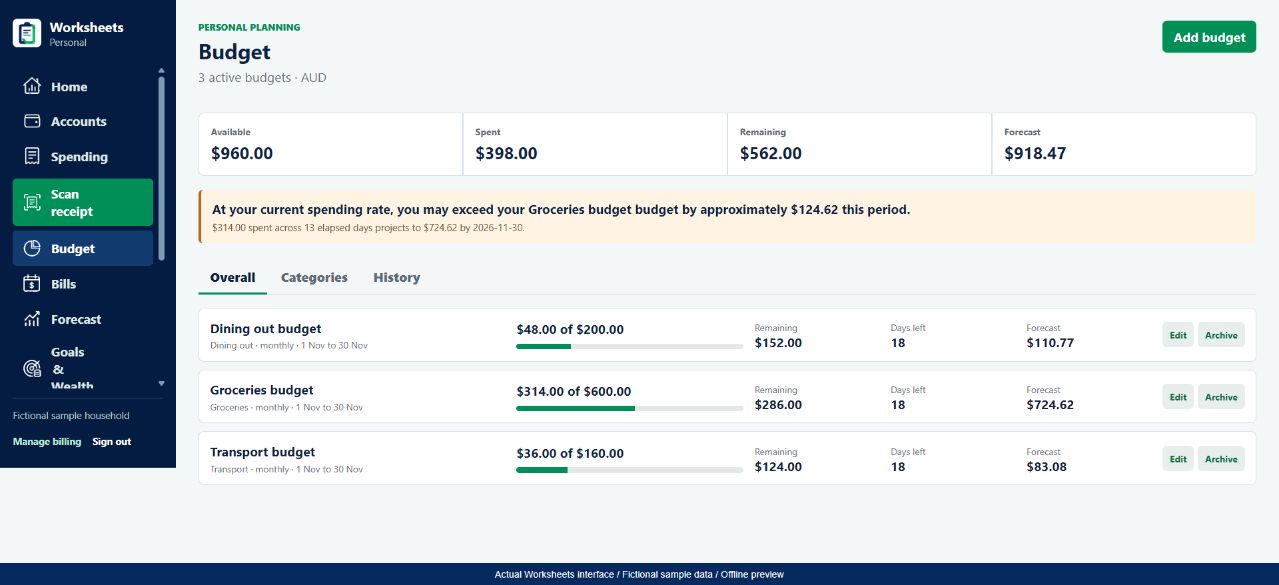
Worksheets Personal lets you create budgets for categories and compare available, spent and remaining amounts. The Overall view brings active budgets together; Categories and History help you look more closely. A spending-rate forecast can flag a category that may run over its limit. It is a projection from recorded activity, not a prediction of what you will definitely spend.
- See the plan and the actual spending together, rather than keeping two separate lists.
- Find a category that needs attention without treating every purchase as a problem.
- Review completed budget periods before choosing a more realistic limit next time.
From the app to your everyday routine
Three practical steps
Add the spending you want to plan around
Add transactions manually or import a statement, then check their dates and categories. A budget cannot account for purchases that are missing from your records.
Create a category budget
Open Budget, choose Add budget and set its amount, category and period. Start with a few everyday categories rather than building a complicated plan on day one.
Review the remaining amount
Use Overall for a quick check, then inspect the category that is running ahead. Update an incorrect transaction or adjust your plan deliberately; do not change a purchase just to make the numbers look better.
A worked example
Three monthly budgets, one clear check-in
Fictional Australian-dollar figures - not personal financial advice
On 13 November 2026, this fictional household has allowed A$600 for groceries, A$200 for dining out and A$160 for transport. Recorded purchases total A$398, leaving A$562 across the three budgets. That remaining amount belongs to these categories; it is not a claim that the household has A$562 spare after rent and every other commitment.
| Category | Monthly plan | Recorded spend | Remaining |
|---|---|---|---|
| Groceries | A$600 | A$314 | A$286 |
| Dining out | A$200 | A$48 | A$152 |
| Transport | A$160 | A$36 | A$124 |
A$960 planned - A$398 spent = A$562 remaining
Groceries have used A$314 in 13 elapsed days. The current-rate projection is A$724.62 for November, so the app flags a possible A$124.62 overrun. This pace-based estimate may be misleading after a large early-month shop; review the actual purchases before changing the budget.
Use the numbers thoughtfully
What to keep in mind
A useful tool makes its limits clear. Check the underlying records before making a financial decision.
- The budget is only as complete as the transactions, categories and dates you have entered or imported.
- A category budget is different from Safe to Spend, which considers dated commitments over a chosen period.
- Worksheets does not stop card purchases, move money into envelopes or guarantee you will stay under budget.
Good questions
Budgeting FAQs
For independent Australian money guidance, visit MoneySmart: how to do a budget. This is a helpful resource, not an endorsement of Worksheets.
Can I use this as an Australian monthly budget planner?
Yes. You can plan in AUD and create monthly category budgets. Use your own income and costs rather than a generic national spending allowance.
Do I need a live bank connection to start?
No. Manual transactions and statement imports provide a way to start. These pages do not promise that a live bank connection is available. Review an import before relying on its totals.
Why is the forecast different from the amount remaining?
Remaining compares the category allowance with recorded spending so far. The forecast extends the current spending rate across the period. Neither figure is a guarantee about future purchases.
Can I review older budget periods?
The Budget History view shows completed periods when there is budget history to display. It helps you compare recorded spending with the plan, not recover transactions that were never entered.
One part of your bigger picture
Keep building your money routine
Explore all Worksheets Personal features or compare plans and pricing.
Worksheets Personal
A clearer picture starts with your next step.
Bring your records together and build a money routine that makes sense to you.
Choose Create account after opening the app.