 Worksheets
Bills and subscriptions
Make the next bill less of a surprise.
Put household bills and their due dates in one place. See what is coming up, review recurring charges and check payments against your own records.
Opens Worksheets Personal. Choose Create account on the next screen.
- Start with your own records
- No live bank connection required
The everyday problem
Bills do not all follow your payday
Rent may be monthly, electricity quarterly and a subscription charged on another date altogether. Remembering an average monthly cost does not tell you what leaves the account this week. Keeping due dates visible is especially useful when several payments land close together.
A clearer way to manage it
How Worksheets helps
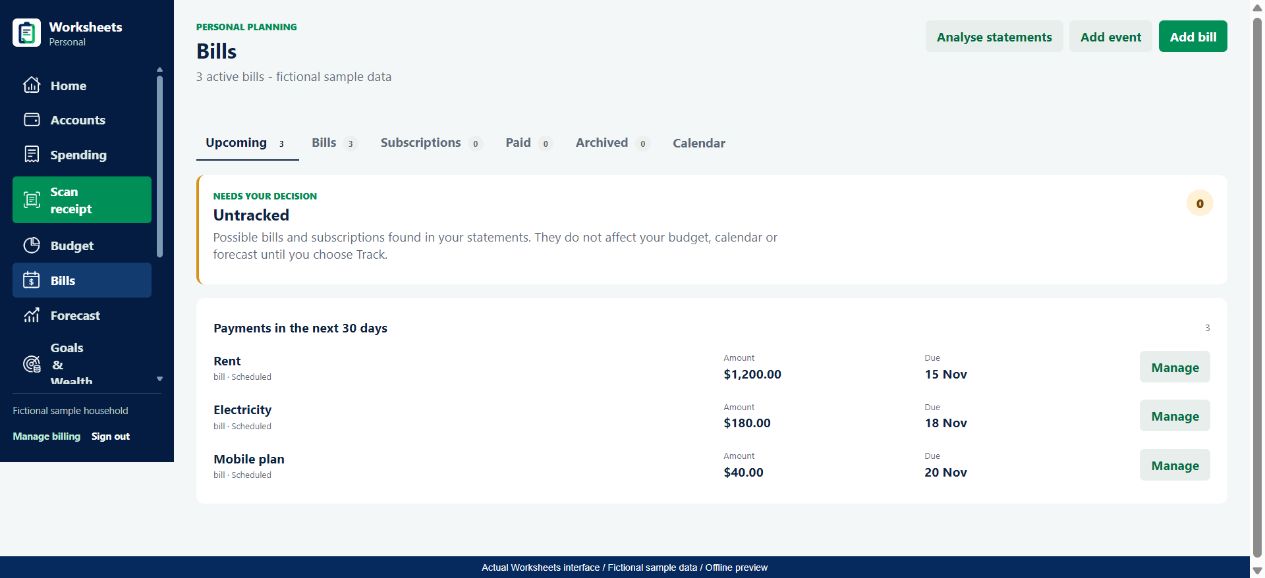
Worksheets Personal has a Bills area with Upcoming, Bills, Subscriptions, Paid, Archived and Calendar views. You can add a bill with an amount, date and recurrence. Analysing imported statements can suggest possible recurring charges, but you decide whether to track them. An untracked suggestion does not become a commitment in your plan until you choose Track.
- Review the next scheduled payments in date order instead of relying on memory.
- Keep a recurring-charge suggestion separate from a bill you have chosen to track.
- Check suggested payment matches rather than assuming every similar bank description is the same bill.
From the app to your everyday routine
Three practical steps
Add the actual bill details
Open Bills > Add bill. Enter the amount, next due date and recurrence shown by your provider. Use an estimate only when necessary and update it when the bill arrives.
Review possible recurring charges
Use Analyse statements after importing transactions. Check the merchant, amount and interval before tracking a suggestion, particularly when one merchant bills for several different services.
Check due dates and payments
Use Upcoming or Calendar to review the schedule. When a recorded transaction is suggested as a bill payment, confirm the match or choose another payment if it is wrong. Keep the due date and amount current.
A worked example
A busy week on the household calendar
Fictional Australian-dollar figures - not personal financial advice
On 13 November, a fictional household has three bills due before its next payday on 21 November. November's electricity bill is a quarterly payment; it must not be treated as another A$180 charge every month. The dated schedule is what matters for the next week.
| Bill | Next due | Recorded recurrence | Amount |
|---|---|---|---|
| Rent | 15 Nov 2026 | Monthly | A$1,200 |
| Electricity | 18 Nov 2026 | Quarterly | A$180 |
| Mobile plan | 20 Nov 2026 | Monthly | A$40 |
A$1,420 scheduled before the next payday
These are expected payments, not proof the money has left the account. If electricity is actually A$196, update the bill to the issued amount and review the new total. A confirmed transaction match should represent a real recorded payment, not just a similar merchant name.
Use the numbers thoughtfully
What to keep in mind
A useful tool makes its limits clear. Check the underlying records before making a financial decision.
- Worksheets does not pay bills, cancel a provider contract or guarantee a bill will never be missed.
- A recurring-charge detection is a suggestion based on imported records. It can miss charges or suggest an incorrect recurrence.
- Email and device alerts depend on your notification settings, permissions and delivery. Keep checking the bill provider's own notices.
Good questions
Bill tracking FAQs
For independent Australian money guidance, visit MoneySmart: steps to get your money sorted. This is a helpful resource, not an endorsement of Worksheets.
Can I track quarterly bills as well as monthly ones?
Yes. The bill schedule supports recurrence, including quarterly bills. Enter the correct next due date and interval so a quarterly amount is not treated like a monthly commitment.
Does a detected subscription get added automatically?
No. Untracked suggestions require your decision. Review the details and choose Track when it belongs in your plan.
Does Paid mean Worksheets paid the bill for me?
No. Worksheets is a planning and record-keeping tool, not a bill-payment service. Review the recorded payment and any match before treating the bill as paid.
Is this a customer-invoicing tool?
No. This page is about an individual or household tracking bills they need to pay. It does not describe issuing sales invoices or collecting payments from customers.
One part of your bigger picture
Keep building your money routine
Explore all Worksheets Personal features or compare plans and pricing.
Worksheets Personal
A clearer picture starts with your next step.
Bring your records together and build a money routine that makes sense to you.
Choose Create account after opening the app.